First Alert 6 Weather
- 4.6
- Rating
- 100.00K
- Installs
- Free
- Price

 Analysis by App-foxy
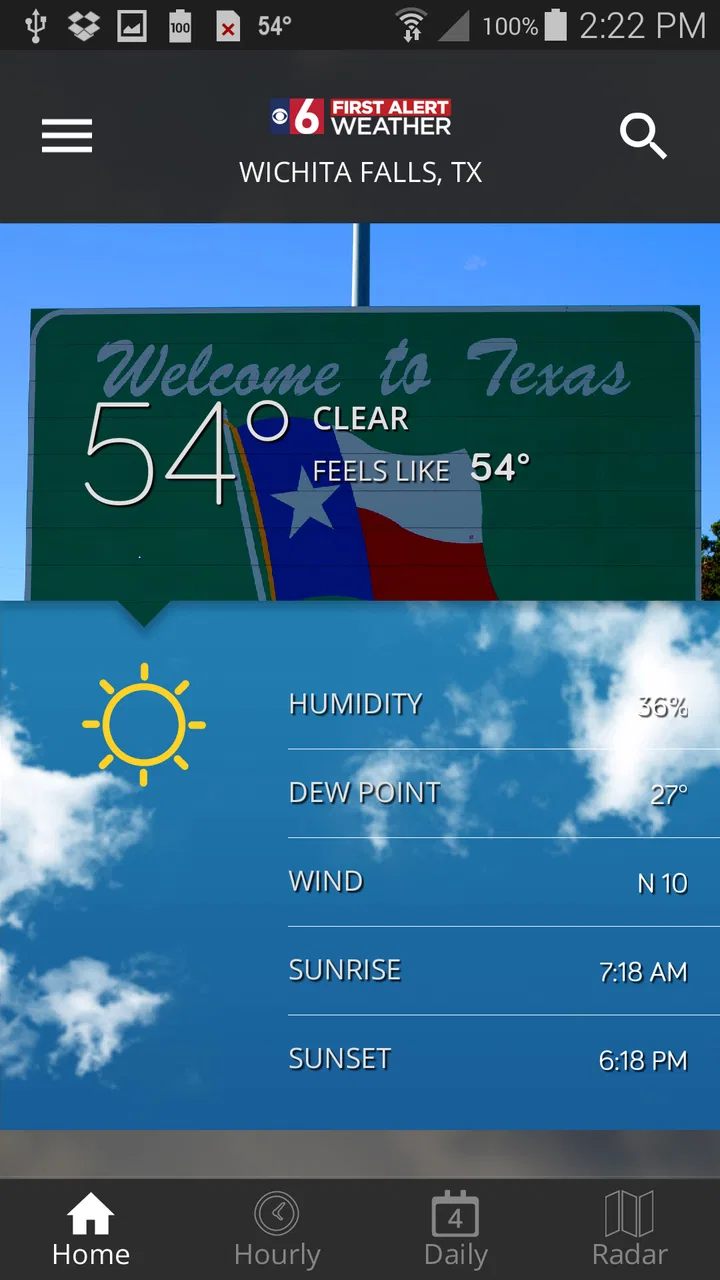
Weather apps are easy to judge by their forecast screen, but I think the more important question is whether the app gives me useful information without making the experience feel unnecessarily complicated. First Alert 6 Weather takes a focused approach: it is a weather app built around the viewing region served by First Alert 6, rather than trying to be an all-purpose weather platform for every location on earth.
That local focus is the main reason I would consider installing it. When I want a quick sense of whether I need a coat, whether rain may affect a school run, or whether outdoor plans need reconsidering, a regional weather app can feel more relevant than a large international service filled with locations and features I never use. The app is free, aimed at Everyone, and comes from KAUZ App Developments. It has reached over one hundred thousand installs and holds a 4.6 average from around one thousand six hundred ratings, which suggests that its straightforward purpose works well for a substantial group of users.
At the same time, I would not recommend it automatically to every weather user. People who want extensive worldwide forecasting tools, deep climate history, highly customizable alerts, or a broad collection of weather models may prefer a more specialized alternative. My impression is that this app makes the most sense when your daily weather decisions are connected to its viewing region and you value a local source over a crowded feature list.
You May Also Like

 Blood Strike: 2.5 Anniversary
Blood Strike’s Loadouts Turn Every Drop Into a Tactical Gamble
A close look at Blood Strike’s custom loadouts: how fast access to signature weapons reshapes its battle royale rhythm, rewards preparation, and narrows the gap between fights.

 Pandora - Music & Podcasts
Pandora’s Music Is Easy to Start, but Harder to Recover
Pandora’s strength is its low-effort path from a seed to a station. Its weak spot is how much confidence it asks you to place in connection, setup, and quiet recovery.

 8 Ball Pool
 Is Built on Rivalries, Rematches, and Routine
A close look at the rivalries, rematches, shared routines, and unanswered safety questions that turn a quick pool match into a persistent mobile community.

 Samsung Music
’s Quiet Strength Is Playing What You Already Own
Its reach comes less from spectacle than from dependable access to a personal library. That simplicity is both the app’s strongest retention engine and its ceiling.

 AccuWeather: Weather Radar
AccuWeather Review: A Quick, Clear Forecast for Everyday Decisions
For everyday plans, the best forecast is the one you can understand quickly. AccuWeather makes rain timing, radar, and local conditions easy to act on, with a few trade-offs.

 Hill Climb Racing
Why Hill Climb Racing Still Turns Crashes Into One More Run
A tiny car, a bumpy hill and one more upgrade: Hill Climb Racing keeps resurfacing because its simple chaos makes every near-miss feel personal.
More From Our News Desk



How the local focus affects everyday trust
The developer’s regional identity matters here. KAUZ App Developments is not presented as a generic utility brand detached from a particular audience; the app is connected to First Alert 6 and its viewing region. That gives the experience a clear purpose. I know what kind of information I am opening it for, and I do not have to pretend that a local weather tool is designed to replace every forecasting service.
For me, trust in a weather app starts with clarity. A forecast is only useful if I understand which place it represents, how current the information appears, and whether I am looking at a general outlook or something relevant to the next few hours. The regional framing helps with the first part, because the app is explicitly intended to serve a defined viewing area. I still make a habit of checking the selected location before acting on a forecast, especially when I am near the edge of that region or traveling.
A realistic example is a weekday morning when I have to decide whether to walk, drive, or leave earlier. I would open the app before breakfast, check the local conditions, and then look again before leaving if the weather is changing quickly. That second check is important: no weather app should turn one glance into a guarantee. The practical value is in helping me make a better decision with current information, not in promising certainty.
The app’s age is also worth putting into context. It was released on December 1, 2015, and the current version is 6.1.604. That history can be reassuring because it shows an established product rather than something completely untested, but it also makes me pay attention to how modern the interface feels on my device. An older app lineage is not automatically a problem; it simply means I judge the current experience by how smoothly it behaves today, not by how long it has existed.
Because the app is free, the barrier to trying it is low. I can use it as a local reference without committing money, which is helpful if I am comparing it with the weather app already installed on my phone. Still, free does not mean frictionless or universally suitable. The real test is whether the local information is presented quickly enough for my routine and whether the app gives me sufficient control over what I see.
What I look for before relying on it
When I test a weather app, I do not only look at the temperature. I check whether the forecast is easy to interpret when I am in a hurry, whether the location context is obvious, and whether the app encourages sensible decisions instead of dramatic reactions to every change. With this app, the most useful mindset is to treat it as a regional information window.
I also avoid assuming that its local emphasis means it will automatically be the best choice for a trip outside the viewing region. If I am planning a journey across several states or countries, I would use a broader weather service alongside it. That is not a criticism of the app’s central idea; it is a boundary created by that idea. A tool designed around a particular audience can be more relevant at home while being less convenient on the road.
One non-obvious benefit of this arrangement is reduced decision fatigue. A national or global weather app may offer many layers, maps, notifications, and location controls. Those can be valuable, but they can also bury the answer to a simple question. With First Alert 6 Weather, I would open it when I want regional awareness first, then move to another service only if the situation demands more detail.
That workflow is especially useful for households where not everyone wants to become a weather enthusiast. A parent checking conditions before a school pickup, a commuter deciding when to leave, or an older family member wanting a familiar local source may benefit from a focused starting point. The app does not need to replace every other tool to be useful; it only needs to make the first weather check clear and relevant.
Controls, permissions, and visible choices
Trust also depends on what the app asks me to do. I pay attention to permission prompts, location behavior, notifications, and any account-related screens. I do not treat a weather app as automatically entitled to every device capability simply because weather can be location-sensitive. If a prompt appears, I want to understand why it is needed and whether I can continue without granting it.
My preferred setup is to begin with the least intrusive option available. I would first see whether I can view the regional forecast manually, then decide whether location access or notifications genuinely improves my routine. If the app lets me choose a location rather than requiring continuous device location, that can be a sensible compromise for privacy-conscious users. If I do enable location, I would review the operating system’s permission settings afterward and change them if the app’s behavior does not match my expectations.
The same principle applies to alerts. Weather notifications can be valuable when conditions are dangerous or rapidly changing, but too many alerts quickly become background noise. I would enable only the notifications that I can act on and disable them during periods when I do not need them. A user should not feel that accepting every alert is the price of using a local forecast.
I am deliberately cautious about making claims beyond what I can see in the app’s controls. A privacy-friendly experience is not established merely by a clean screen, and a busy permission prompt does not automatically prove poor practices. I judge the visible choices: whether requests are understandable, whether settings are reachable, whether I can revoke access through the phone, and whether the app remains useful when I decline optional access.
This is one area where I would encourage a new user to slow down during first launch. Instead of tapping through every prompt, read each one and decide based on your own routine. If you only want a quick regional forecast, manual use may be enough. If you want the app to support your commute or severe-weather awareness, notifications and location may be more relevant. The right setup depends on the user, not on a single default configuration.
Privacy-sensitive moments in a weather routine
Weather apps often feel harmless because the information they display is public. The sensitive part is usually the relationship between weather information and the user’s location, schedule, or habits. I think about this when checking the forecast at home, at work, or while traveling. A location-aware tool can be convenient, but convenience should not remove my ability to decide when location access is appropriate.
For that reason, I would avoid granting more access than I need for the task. If I am checking conditions for a fixed home area, manually choosing that area may be preferable to sharing live location every time. If I am driving through unfamiliar places, temporary location access could be more useful. I would make that choice based on the situation rather than leaving a broad permission active indefinitely without reviewing it.
Notifications deserve similar thought. A lock-screen forecast or warning can reveal where I am or what kind of routine I follow, particularly if someone else can see my phone. I would review how notifications appear and whether sensitive details are shown before unlocking the device. This is not a claim about a hidden policy or a specific data practice; it is simply a practical privacy check that applies whenever a weather app can surface information automatically.
Account controls are another point I consider before settling on an app. I prefer services that explain whether an account is necessary and make it easy to manage any personal settings. With a focused regional weather tool, I would start by seeing how much I can do without creating an account. If the app provides useful access without asking me to build a profile, that keeps the initial commitment small. If an account screen appears for optional features, I would decide whether those features justify it.
The most useful habit is to revisit these choices after a few days. Many people accept permissions during setup and never look again, even when their needs change. Once I know whether I actually use alerts or location, I can tighten the setup. That gives me more control without abandoning the app’s local usefulness.
Where it fits beside the usual weather alternatives
The weather app already installed on an Android or iOS device is usually the easiest alternative. It is convenient, familiar, and often good enough for a quick temperature check. First Alert 6 Weather has a different appeal: its identity is tied to a specific viewing region and local weather audience. I would choose it when that local context matters more to me than having a universal app preloaded on my phone.
Large national services are stronger choices when I need many saved locations, travel planning, international coverage, or more elaborate visual tools. They may also be better for users who compare detailed hourly information, radar layers, or specialized forecasts. If those are the features I use every day, a regional app may feel limited even if its core information is useful.
On the other hand, a generic phone widget can be too easy to ignore. It may show a temperature without giving me the local context I want before a weather-sensitive decision. I see First Alert 6 Weather as a deliberate check rather than passive decoration. Opening it can encourage me to look at the broader situation instead of reacting to one number on the home screen.
My practical recommendation is to compare them for one normal week rather than deciding from a single glance. Use the local app for morning planning, the built-in tool for quick checks, and a broader service when traveling. Pay attention to which one helps you make decisions with the least confusion. If First Alert 6 Weather consistently gives you the regional information you need, keeping it installed makes sense. If you constantly leave it to find maps, distant locations, or more technical detail, another service is probably a better primary option.
Who will benefit, and who should skip it
I think this app is a strong candidate for people who live within the First Alert 6 viewing region and want a free, local weather reference. It can also suit families, commuters, and casual users who prefer a focused experience over a national dashboard. The Everyone content rating makes it approachable for a broad audience, although every user should still make personal decisions about permissions and notifications.
It is less convincing for someone who spends most of the year traveling, needs forecasts for multiple countries, or wants advanced analysis as part of professional outdoor work. A dedicated aviation, marine, hiking, or storm-tracking tool may be more appropriate for those situations. I would also hesitate to make it my only source during high-risk weather if my safety depends on specialized warnings or information from an official emergency channel.
Another trade-off is that local relevance can become a limitation when my day crosses regional boundaries. Someone commuting between areas may need to verify that the displayed location matches the place where they will actually be. This is a small habit, but it prevents one of the most common weather-app mistakes: acting on a correct forecast for the wrong place.
The app’s strongest use case is not entertainment or deep meteorological study. It is the repeated, ordinary decision: leave now or later, carry rain gear or not, adjust an outdoor plan, or check what the day may bring. I appreciate tools that know their role, and this one appears most useful when I let it serve that role instead of expecting it to become a complete weather command center.
My cautious recommendation
After considering the local purpose, free access, established history, and regional audience, I would recommend trying First Alert 6 Weather if you are inside its intended viewing area. Its 4.6 average and more than one hundred thousand installs make it a credible option to test, but I would still judge it by my own daily routine rather than by popularity alone. The app has to be clear, timely, and comfortable to use on my phone.
I would install it, review every permission request instead of accepting everything automatically, and begin with manual checks. After that, I would enable only the location and notification choices that solve a real problem for me. This approach keeps the app useful while preserving user control, which is especially important for a service that may interact with location and lock-screen alerts.
My final view is favorable but deliberately limited: this is a sensible regional weather companion, not a universal replacement for every forecasting tool. Its value comes from being connected to the First Alert 6 viewing region and from offering a focused starting point for everyday planning. If that matches where you live and how you use weather information, I can see it becoming a dependable part of your morning routine. If you need worldwide coverage, advanced weather layers, or specialized safety information, I would keep a broader or more technical alternative available.
The best reason to choose it is local relevance with a manageable setup; the best reason to look elsewhere is a need for deeper control and wider coverage. That balance makes the app worth trying, provided I remain attentive to the location, notification, and account choices presented on my own device.
FAQs for First Alert 6 Weather
01What platforms is the First Alert 6 Weather app available on?
The First Alert 6 Weather app is available for both Android and iOS devices. Users can download it from the Google Play Store for Android and the Apple App Store for iOS. It is compatible with most modern smartphones and tablets, ensuring a wide range of accessibility.
02What features does the First Alert 6 Weather app offer?
The app provides real-time weather updates, severe weather alerts, and interactive radar maps. Users can access detailed forecasts, including hourly and 10-day predictions. The app also includes video forecasts and the ability to customize weather alerts for specific locations, keeping users informed and prepared.
03Does the First Alert 6 Weather app require a subscription?
The First Alert 6 Weather app is free to download and use. However, there may be optional in-app purchases or premium features that require a subscription. It's advisable to check the app's store listing for any additional costs or features that might be offered.
04How accurate is the weather data provided by the app?
The First Alert 6 Weather app sources its data from trusted meteorological services, ensuring high accuracy. It uses advanced algorithms and real-time updates to provide precise weather information. However, like all weather apps, unforeseen changes in weather conditions can affect accuracy, so users should stay informed through multiple sources during critical weather events.
05Can I customize the notifications I receive from the app?
Yes, the First Alert 6 Weather app allows users to customize notifications based on their preferences. You can choose to receive alerts for severe weather, daily forecasts, or specific weather conditions. This customization ensures that users receive only the information that is most relevant to them, enhancing the app's usefulness.
Pros
- Accurate real-time weather updates.
- Customizable alerts for severe weather.
- User-friendly interface and navigation.
- Detailed radar and satellite imagery.
- Minimal data usage for efficient performance.
Cons
- Limited features in the free version.
- Occasional ad interruptions.
- Requires location access for accuracy.
- No offline mode available.
- Battery drain with prolonged use.

First Alert 6 Weather
Gallery